

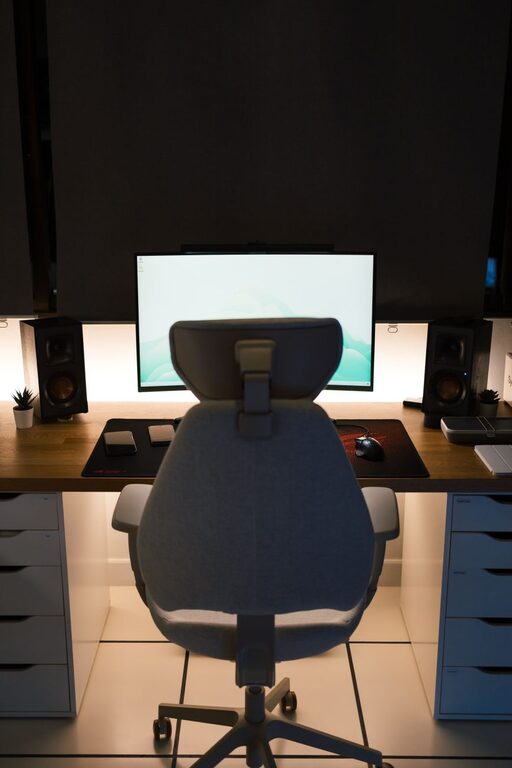
Working from home is easier when your workspace is designed for both comfort and focus. A thoughtful setup can help you stay organized, reduce distractions, and make your workday feel more manageable. You do not need a large room or expensive equipment to create an effective home workspace. With a few practical adjustments, almost any area can become a productive place to work.
Choose the Right Location
The best workspace location depends on your home, schedule, and type of work. If possible, choose an area with enough room for your desk, chair, supplies, and movement.
A separate room is ideal because it creates a clear boundary between work and personal time. However, a corner of a bedroom, living room, dining area, or hallway can work just as well when space is limited.
When choosing a location, consider:
– The amount of natural light
– Noise from other rooms or outside
– Access to power outlets
– Internet connection strength
– Available storage
– How easily the area can be kept tidy
Try to avoid placing your desk in a high-traffic area if you need regular concentration. If a busy location is your only option, use a room divider, bookshelf, or curtain to create a stronger visual separation.
Select a Desk That Fits Your Needs
Your desk should provide enough space for your computer, notebook, water bottle, and other daily essentials. A surface that is too small can feel crowded, while a desk that is too large may take up unnecessary room.
Before buying or arranging a desk, measure the available area. Leave enough space to pull out your chair and move comfortably. If you use multiple screens, frequently write by hand, or work with physical documents, choose a wider surface.
Consider Flexible Desk Options
A traditional desk is not the only choice. Depending on your home, you might use:
– A compact writing desk
– A wall-mounted folding desk
– A corner desk
– A repurposed dining table
– A standing desk converter
– A small table with built-in storage
Look for a sturdy design with a smooth, easy-to-clean surface. Adjustable features can be useful if more than one person uses the workspace.
Invest in a Supportive Chair
A comfortable chair is one of the most important parts of a home workspace. Look for a chair that allows you to sit with your feet supported and your back in a natural position.
Useful features may include:
– Adjustable seat height
– Lower back support
– A stable base
– Comfortable padding
– Adjustable armrests
– A seat that allows easy movement
You do not necessarily need an expensive office chair. A well-built dining chair can work temporarily, especially when paired with a supportive cushion. However, avoid using a sofa or bed as your main work seat. These surfaces often encourage poor posture and make it harder to stay alert.
Arrange Your Screen and Keyboard
Place your monitor directly in front of you so you do not need to turn your head for long periods. The top portion of the screen should be near eye level, allowing you to look forward without constantly tilting your head down.
If you use a laptop, consider adding a laptop stand or a stack of sturdy books to raise the screen. You can then use a separate keyboard and mouse at a comfortable height.
Keep the keyboard and mouse close enough that your shoulders can remain relaxed. Your elbows should stay near your sides rather than reaching forward. Small adjustments to screen height and equipment placement can make the workspace feel much more comfortable.
Use Lighting Wisely
Good lighting helps your workspace feel inviting and makes reading and computer work easier. Natural light is often a great option, but avoid placing your monitor directly in front of a bright window or with a window directly behind it. Both positions can create glare.
Place your desk near a window if possible, while positioning the screen at an angle to the light. Use curtains or blinds to soften strong sunlight during the brightest part of the day.
Add a desk lamp for cloudy days, evening work, or tasks that require close attention. A lamp with an adjustable arm allows you to direct light where it is needed. Choose a shade that reduces harsh glare, and keep bright bulbs out of your direct line of sight.
Organize Cables and Supplies
A tidy workspace is easier to use and maintain. Loose cables can make the area look cluttered and may become a tripping hazard.
Start by identifying the cables you use every day. Group them with reusable ties or simple cable clips. Label chargers when several look alike, and keep rarely used cords in a nearby box or drawer.
Store frequently used supplies within easy reach. A small tray, desk organizer, or set of containers can hold pens, notes, headphones, and charging accessories. Keep only essential items on the desktop so you have room to work.
Create Simple Storage Zones
Assign each item a regular home:
– Daily supplies in a desktop organizer
– Important documents in a labeled folder
– Extra stationery in a drawer or box
– Electronics accessories in a small container
– Personal items outside the main work area
This system makes it easier to put things away at the end of the day and quickly find them when needed.
Reduce Distractions
A productive workspace does not have to be completely silent, but it should help you focus. Identify the distractions that affect you most and make small changes to reduce them.
If noise is a problem, consider headphones, soft background sounds, or a white noise machine. If your phone often interrupts your concentration, place it across the room or turn off nonessential notifications.
Visual distractions can also affect focus. Keep unnecessary objects out of your direct view, and use a closed cabinet or storage box for items that create clutter. If other household activities are distracting, agree on simple work-time boundaries with the people you live with.
Add Comfort Without Adding Clutter
Personal touches can make a home workspace more pleasant. Add one or two items that help the area feel welcoming, such as a framed print, small plant, comfortable rug, or favorite notebook.
Be selective. Too many decorations can reduce usable space and create more items to clean. Choose additions that support the atmosphere you want without taking attention away from your work.
Temperature and airflow also matter. Keep the workspace away from strong drafts when possible, and open a window or adjust the room temperature if the area feels stuffy.
Build Helpful Workday Habits
A well-designed workspace works best when paired with consistent habits. Begin the day by clearing the desk and identifying your most important tasks. This gives you a clear starting point.
During the day, take short breaks to stand, walk, stretch, or look away from the screen. You can use a timer or calendar reminder if breaks are easy to forget. Regular movement also helps divide long periods of work into more manageable blocks.
At the end of the day:
- Save and close your work.
- Return supplies to their storage areas.
- Clear unnecessary papers and cups.
- Make a note of unfinished tasks.
- Turn off equipment that does not need to remain on.
This simple closing routine creates a visible end to the workday and makes the workspace ready for the next morning.
Review and Improve Your Setup
Your workspace does not need to be perfect from the beginning. Use it for a week and notice what feels uncomfortable, distracting, or inconvenient. You may discover that your lamp needs to move, supplies should be closer, or the chair requires adjustment.
Make one change at a time so you can tell what improves the experience. A comfortable, productive workspace is built through small improvements rather than one major purchase.
By choosing a suitable location, arranging your equipment thoughtfully, improving lighting, controlling clutter, and creating consistent routines, you can build a home workspace that supports focused and comfortable work every day.